Fast to build
You can manage models without writing a separate page for every form and table.
Django Admin is a built-in interface for managing your app’s data. It is not a ready-made public dashboard. It is a CRUD tool (Create, Read, Update, Delete) that Django builds automatically from your model definitions and admin settings.
Fast to build
You can manage models without writing a separate page for every form and table.
Safe by default
It uses Django’s login, permissions, and groups instead of needing a custom auth system.
Easy to extend
You can add search, filters, actions, inlines, and custom links whenever you need them.
Not for public UI
It is meant for staff users and internal work, not for a polished customer-facing app.
Use Django Admin for internal tools, content management, support work, operations panels, and back-office tasks. It is a great choice when staff need to edit data quickly and the workflow is simple.
Do not use it as the main public interface when you need a custom design, a custom user flow, or a public-facing product experience.
You want to manage model data fast, you trust Django’s default workflow, and the users are internal staff.
You need a public site, complex approval flows, or a design that must look very different from Django’s default admin.
The admin is powerful, but it is still a generic tool. Heavy customization can become harder than just building a custom dashboard from scratch.
In simple terms, admin does this:
The admin site comes built into Django, but it also depends on a few other built-in apps. A normal project usually needs all of these:
INSTALLED_APPS = [ "django.contrib.admin", "django.contrib.auth", "django.contrib.contenttypes", "django.contrib.sessions", "django.contrib.messages", "django.contrib.staticfiles",]auth handles users, groups, and permissions. contenttypes helps Django understand models in a generic way. sessions keeps the login session active. messages lets admin show success and error messages.
from django.contrib import adminfrom django.urls import path
admin.site.site_header = "Project Admin Control"admin.site.index_title = "Admin Panel"admin.site.site_title = "Project Admin"
urlpatterns = [ path("admin/", admin.site.urls),]site_header, index_title, and site_title are small branding changes. They are useful when your admin is part of a real product and you want the page to feel like your own app instead of a generic one.
python manage.py createsuperuserpython manage.py changepassword admincreatesuperuser creates the first staff user who can log in to admin. changepassword is useful when you need to reset a local or test account’s password.
INSTALLED_APPS.There are many ways to register a model in admin. Here are the most common ones.
from django.contrib import adminfrom .models import Product
admin.site.register(Product)
This is the fastest way to make a model show up in admin. Django will create the list page, the add page, the edit page, and the delete flow for you automatically.
This is the most commonly used way to register a model. It gives you a class where you can customize how the admin behaves.
from django.contrib import adminfrom .models import Product
@admin.register(Product)class ProductAdmin(admin.ModelAdmin):    pass
ModelAdmin is where you control how the model looks and behaves in admin. In practice, most of the useful admin work happens here.
Use plain registration when you only need basic CRUD. Use ModelAdmin when you need search, filters, custom columns, inlines, or permission-based behavior.
Do not register every model blindly. If a model is private, temporary, or never edited by staff, it may not need an admin page at all.
The list page is the main table you see after opening a model in admin. This is where most admin usage happens.
list_displaylist_display decides which columns show up on the list page. By default, admin only shows the __str__() value of each record. To show more fields, you need to set list_display on the admin class.
from django.contrib import admin
@admin.register(Product)class ProductAdmin(admin.ModelAdmin):    list_display = ("id", "name", "price", "is_active")
list_display decides which columns appear on the table.
Use it for the fields that matter most to staff. Keep it short and useful. Too many columns make the page harder to read.
list_displayYou cannot write something like category__name directly inside list_display. Instead, you need to add a method on the admin class.
from django.contrib import admin
@admin.register(Product)class ProductAdmin(admin.ModelAdmin):    list_display = ("name", "category_name", "stock_status")
    @admin.display(description="Category")    def category_name(self, obj):        return obj.category.name
    @admin.display(ordering="inventory", description="Stock")    def stock_status(self, obj):        return "OK" if obj.inventory > 10 else "Low"
@admin.display decorator@admin.display lets you set a column title and sorting behavior for a method-based column.
Inside this decorator, description sets the column header, and ordering tells admin which field to use when sorting by this column. It also helps you create computed columns on the fly, without needing a separate method just for display purposes.
@admin.register(Product)class ProductAdmin(admin.ModelAdmin):    list_display = ("name", "category_name")
    @admin.display(description="Category")    def category_name(self, obj):        return obj.category.name
@admin.display(ordering="inventory", description="Stock") def stock_status(self, obj): return "OK" if obj.inventory > 10 else "Low"list_display_linksThis controls which columns can be clicked to open the edit page for that record.
class ProductAdmin(admin.ModelAdmin): list_display = ("name", "price", "is_active") list_display_links = ("name",)This decides which column opens the edit page when clicked. Usually, one column should be clickable so users can move from the list to the edit form easily.
list_editableThis lets you edit a field directly from the list page, without opening the full edit form.
class ProductAdmin(admin.ModelAdmin): list_display = ("name", "price", "is_active") list_display_links = ("name",) list_editable = ("is_active",)This allows quick inline editing right from the table.
Use it when staff often need to change a small set of fields directly from the list page. Do not use it for fields that need a lot of context or careful review.
list_per_pageThis controls how many rows show up on each page of the list view.
class ProductAdmin(admin.ModelAdmin): list_per_page = 50This controls pagination. Lower values make the page load faster. Higher values mean less clicking, but the page can become slower.
orderingThis sets the default sort order for the list page.
class ProductAdmin(admin.ModelAdmin): ordering = ("-created_at", "first_name")This sets the default sort order. The first field decides the main order, and the next field is used only when the first value is the same for two rows.
Use them when the list page is the main place where staff work. Keep the table focused on the few values they actually need to make quick decisions.
Do not overload the page with every single field from the model. That makes the table slow, too wide, and hard to scan.
Sometimes the table needs to show a value that does not exist as a real model field. A computed column is a method that returns a value for each row.
from django.contrib import admin
@admin.register(Product)class ProductAdmin(admin.ModelAdmin):    list_display = ("name", "price", "discounted_price")
@admin.display(description="Discounted Price") def discounted_price(self, obj): return obj.price * 0.9This is useful for display-only values, such as formatted labels, status text, or a related object’s name.
Computed columns run in Python for every row. If the method does database work, the page can become slow very quickly.
If a value can be calculated by the database itself, use annotate() inside get_queryset() instead of doing the work in Python. By using annotate(), you can add a computed value to the queryset that gets calculated in the database, which is much faster than calculating it in Python.
from django.contrib import adminfrom django.db.models import Count
@admin.register(Collection)class CollectionAdmin(admin.ModelAdmin):    list_display = ("name", "product_count")
    @admin.display(ordering="product_count", description="Products")    def product_count(self, obj):        return obj.product_count
# this method adds a product_count annotation to the queryset, which is calculated # in the database and can be used for sorting and display without extra queries per row def get_queryset(self, request): qs = super().get_queryset(request) return qs.annotate(product_count=Count("products"))If your table shows data from a foreign key field, admin might query the related object one row at a time. This creates the N+1 problem.
list_select_relatedclass ProductAdmin(admin.ModelAdmin): list_display = ("name", "category_name") list_select_related = ("category",)
@admin.display(description="Category") def category_name(self, obj): return obj.category.namelist_select_related tells admin to join the related table in the same query. It works best for foreign keys and one-to-one fields.
Use it when your list page shows foreign key data, such as a product’s category name or a blog post’s author name.
Do not expect it to help with many-to-many data. For many-to-many relationships, use prefetch_related() inside get_queryset() instead.
It helps with performance, but it is not a magic fix. You still need to think about the total number of queries the page makes.
get_queryset()get_queryset() lets you change which records admin shows. In other words, with this get_queryset() method, you can filter the list page to show only active products, or only the records that belong to the logged-in user.
from django.contrib import admin
@admin.register(Product)class ProductAdmin(admin.ModelAdmin):    def get_queryset(self, request):        qs = super().get_queryset(request)        return qs.filter(is_active=True)
# or@admin.register(Collection)class CollectionAdmin(admin.ModelAdmin):    list_display = ("name", "product_count")
    @admin.display(ordering="product_count", description="Products")    def product_count(self, obj):        return obj.product_count
    # this method adds a product_count annotation to the queryset, which is calculated    # in the database and can be used for sorting and display without extra queries per row    def get_queryset(self, request):        qs = super().get_queryset(request)        return qs.annotate(product_count=Count("products"))
You can use this to hide soft-deleted rows, show only a user’s own records, add annotations, or pre-load related data.
The request parameter lets you check the logged-in user and their permissions.
This is useful when different staff members should see different data.
Use it when the admin list needs to be filtered by business rules, or when you need to prepare better query data for the table.
Do not use it to hide data in a confusing way. If staff need to understand why some records are missing, the rule behind it should be clear.
Admin pages often need links to related records or filtered views.
from django.contrib import adminfrom django.urls import reversefrom django.utils.html import format_html, urlencode
@admin.register(Product)class ProductAdmin(admin.ModelAdmin):    list_display = ("name", "category_link")
    @admin.display(description="Category")    def category_link(self, obj):        # urls.py name + : + appname + _ + modelname + _ + page        url = reverse("admin:store_category_change") + urlencode({'products__id': str(obj.id)})        return format_html('<a href="{}">{}</a>', url, obj.category.name)
reverse() builds the admin URL safely. format_html() escapes the values before sending HTML to the page, which helps prevent XSS problems.
Use links when staff need to move quickly between related records.
Do not add links that send people to confusing places. If the target page is not obvious, the list page becomes harder to use.
search_fields adds a search box at the top of the admin list page.
class ProductAdmin(admin.ModelAdmin): search_fields = ("name", "description", "sku__icontains", "id__exact")By default, admin searches using a text match. You can also guide how the search behaves with prefixes:
startswith means starts withexact means exact matchicontains means case-insensitive containsUse search when staff already know a name, email, code, or short text they want to find quickly.
Do not expect search to work well on every huge text field without planning ahead. Searching long text can be slow if you do not have a good database strategy in place.
list_filterlist_filter adds a sidebar with quick filters.
class ProductAdmin(admin.ModelAdmin): list_filter = ("is_active", "category")This is great when staff often want to narrow down the list by status, category, date, or something similar.
from django.contrib.admin import SimpleListFilter
class InventoryFilter(SimpleListFilter):    title = 'inventory status'    parameter_name = 'inventory_status'
    def lookups(self, request, model_admin):        return (            ('<10', 'Low'),        )
    def queryset(self, request, queryset):        if self.value() == '<10':            return queryset.filter(inventory__lte=10)

class ProductAdmin(admin.ModelAdmin): list_filter = (InventoryFilter,)Use filters when staff keep asking the same question over and over, such as “show active items only” or “show low stock products.”
Do not add too many filters. A crowded filter sidebar can slow people down instead of helping them.
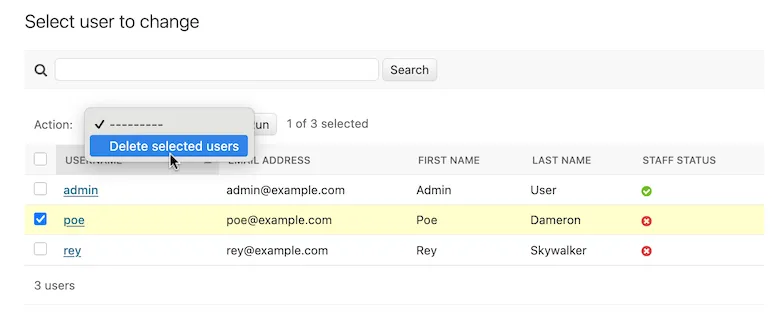
Actions let staff perform one operation on many selected rows at the same time.
from django.contrib import admin
@admin.register(Product)class ProductAdmin(admin.ModelAdmin):    actions = ["clear_inventory"]
@admin.action(description="Clear inventory") def clear_inventory(self, request, queryset): updated_count = queryset.update(inventory=0) self.message_user(request, f"{updated_count} products had their inventory cleared.")They are great for bulk status changes, cleanup jobs, and simple one-step updates.
save() is not called for each object. But sometimes save() gets called automatically by the ORM when you use update(), so be careful with side effects.Use actions for fast staff workflows where the same change needs to apply to many rows at once.
Do not use actions for anything that needs careful, object-by-object review, complex validation, or a custom approval step.
Admin forms control which fields are visible and how staff can edit them.
fieldsclass ProductAdmin(admin.ModelAdmin): fields = ("name", "price", "category")This sets the form layout and shows only the fields you choose.
excludeclass ProductAdmin(admin.ModelAdmin): exclude = ("created_at", "updated_at")This hides certain fields from the form.
readonly_fieldsclass ProductAdmin(admin.ModelAdmin): readonly_fields = ("created_at", "updated_at")This shows the field but does not allow it to be edited. It is useful for timestamps, IDs, or computed values.
prepopulated_fieldsclass ProductAdmin(admin.ModelAdmin): prepopulated_fields = {"slug": ("name",)}This fills one field automatically using the value from another field, usually for slugs.
Use it when a value should usually come from another field, and staff should only need to adjust it sometimes.
autocomplete_fields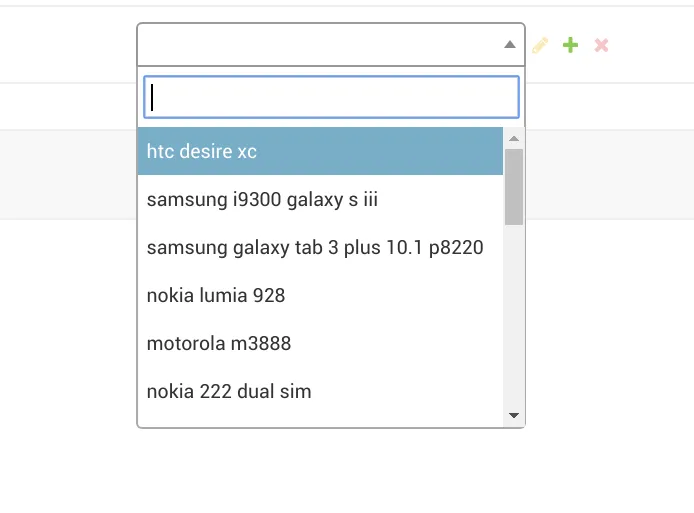
class ProductAdmin(admin.ModelAdmin): autocomplete_fields = ("category",)This shows a search box instead of a long dropdown. It is the better choice when the related table has a lot of rows.
The related model’s admin must have search_fields set up. In other words, it needs search_fields on that related model admin for this to work. For example, if you want to use autocomplete_fields for the category field in ProductAdmin, then CategoryAdmin must have search_fields defined.
class CategoryAdmin(admin.ModelAdmin): search_fields = ("name",)filter_horizontal and filter_verticalfilter_horizontal and filter_vertical can make many-to-many selection easier by showing a dual-list widget.
Use autocomplete_fields instead. It is easier to use when there are a lot of choices to pick from.
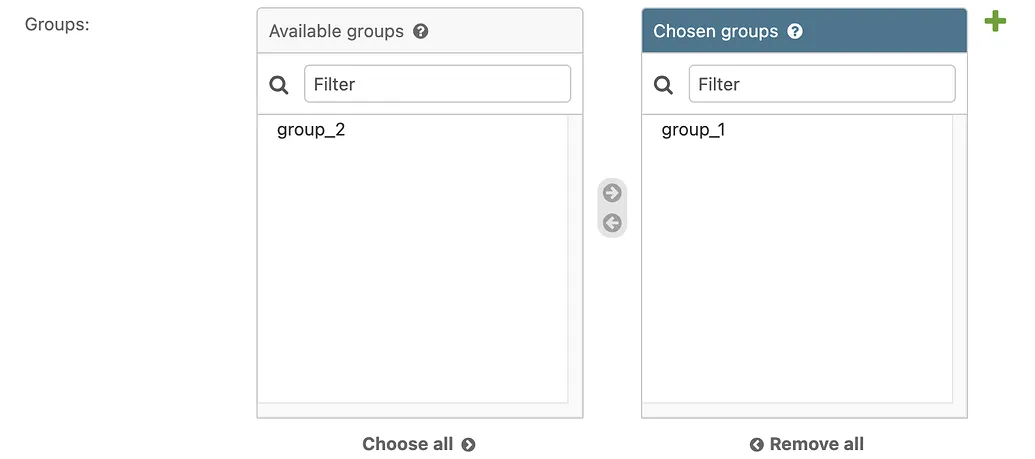
class ProductAdmin(admin.ModelAdmin): filter_horizontal = ("category",)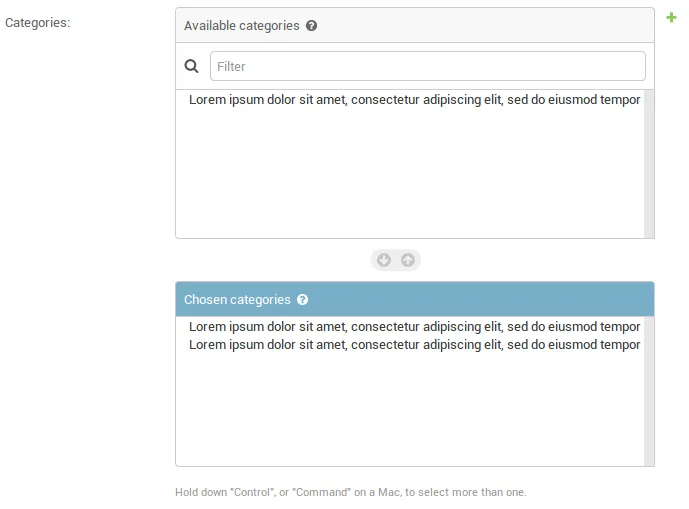
class ProductAdmin(admin.ModelAdmin): filter_vertical = ("category",)Use form customization when you want a cleaner workflow for staff, and you already know exactly which fields belong on the page.
Do not hide important business fields just to make the form look smaller. Staff still need the right information to make good decisions.
Admin uses Django’s normal validation system. That means field validators, form validation, and model validation all still matter here too.
from django.db import modelsfrom django.core.validators import MinValueValidator, MaxValueValidator
class Product(models.Model):    price = models.DecimalField(        max_digits=10,        decimal_places=2,        validators=[MinValueValidator(0), MaxValueValidator(10000)],    )
These validators check a field before the model gets saved.
clean()from django.core.exceptions import ValidationError
class Product(models.Model): price = models.DecimalField(max_digits=10, decimal_places=2)
def clean(self): if self.price < 0: raise ValidationError({"price": "Price cannot be negative."})clean() is for rules that need more than one field, or a custom business check.
clean() runs during model form validation.Use validation when the data must be correct no matter where it comes from, whether that is admin, a form, or any other entry point.
Do not put validation logic only inside the admin class if the same model can also be written from other parts of the app.
Inlines let you edit related child records on the same page as the parent record. For example, you can edit order items right on the order page, instead of opening a separate page for each one.
TabularInlinefrom django.contrib import admin
class OrderItemInline(admin.TabularInline): model = OrderItem extra = 0
@admin.register(Order)class OrderAdmin(admin.ModelAdmin): inlines = [OrderItemInline]TabularInline shows child rows in a compact table.
StackedInlineclass OrderItemInline(admin.StackedInline): model = OrderItem extra = 0
@admin.register(Order)class OrderAdmin(admin.ModelAdmin): inlines = [OrderItemInline]StackedInline shows each child item in a larger block. It is easier to read when each child has many fields.
Use inlines when the parent and child objects are usually edited together, such as orders and order items, articles and images, or invoices and line items.
Do not use inlines for very large child lists. The page can become long and slow.
Generic relations let one model point to many different kinds of models (it is not a normal field or a normal foreign key, it is used for connecting unrelated models). This is useful for comments, tags, attachments, and activity logs.
from django.db import modelsfrom django.contrib.contenttypes.fields import GenericForeignKeyfrom django.contrib.contenttypes.models import ContentType
class TaggedItem(models.Model):    tag = models.CharField(max_length=50)    content_type = models.ForeignKey(ContentType, on_delete=models.CASCADE)    object_id = models.PositiveIntegerField()    content_object = GenericForeignKey("content_type", "object_id")
from django.db import modelsclass Product(models.Model): name = models.CharField(max_length=100) # other fields...from django.contrib import adminfrom django.contrib.contenttypes.admin import GenericTabularInlinefrom tags.models import TaggedItem
class TaggedItemInline(GenericTabularInline): model = TaggedItem autocomplete_fields = ("tag",)
@admin.register(Product)class ProductAdmin(admin.ModelAdmin): list_display = ("name", "price", "is_active") search_fields = ("name",) # other admin settings... inlines = [TaggedItemInline]from django.contrib import adminfrom .models import TaggedItem
@admin.register(TaggedItem)class TaggedItemAdmin(admin.ModelAdmin): list_display = ("tag", "content_object") search_fields = ("tag",)It gives you one tagging or comment system that can be attached to many different model types.
Pluggable apps means moving the admin customization for a model into a separate app. The model itself stays the same. Only the admin behavior changes.
Use this pattern when one app should not depend too heavily on another app’s admin code. A common example is a store app that needs tagging behavior from a tags app. Putting that admin code in a separate app keeps the original app smaller and easier to reuse elsewhere.
In short:
This is useful when you want to reduce coupling between apps without changing the database model or any stored data.
from django.contrib import adminfrom .models import Product
@admin.register(Product)class ProductAdmin(admin.ModelAdmin):    list_display = ("name", "price", "is_active")    search_fields = ("name",)    # other admin settings...
from django.contrib import adminfrom .models import TaggedItem
@admin.register(TaggedItem)class TaggedItemAdmin(admin.ModelAdmin): list_display = ("tag", "content_object") search_fields = ("tag",)Create a new Django app for the admin customization.
uv run manage.py startapp store_tags_plugableRegister the new app in INSTALLED_APPS after the original app.
INSTALLED_APPS = [ # other apps... "store_tags_plugable", # new app for admin customization]Create a new admin class for Product, then unregister the old admin and register the new one.
from django.contrib import adminfrom django.contrib.contenttypes.admin import GenericTabularInlinefrom tags.models import TaggedItemfrom store.admin import ProductAdminfrom store.models import Product
class CustomTaggedItemInline(GenericTabularInline):    autocomplete_fields = ('tag',)    model = TaggedItem
class CustomProductAdmin(ProductAdmin):    inlines = [CustomTaggedItemInline]
admin.site.unregister(Product)admin.site.register(Product, CustomProductAdmin)Use this pattern when the model already has an admin class, but you want to move the admin rules into another app for cleaner separation.
Do not use this pattern if a normal ModelAdmin registration already solves the problem. In that case, just keep the admin code in the same app and skip the extra layer.
Django Admin is protected by Django’s login and permission system, but you still need to write safe code inside your admin class.
format_html() for any HTML output.