Asyncio and Concurrency
In this chapter, we’ll look at asyncio and concurrency in Python in simple terms. We’ll cover async/await, event loops, threads, processes, the Global Interpreter Lock (GIL), and the concurrent.futures module. By the end of this chapter, you’ll understand how to write concurrent code in Python and know when to use each approach.
Concurrency VS Parallelism
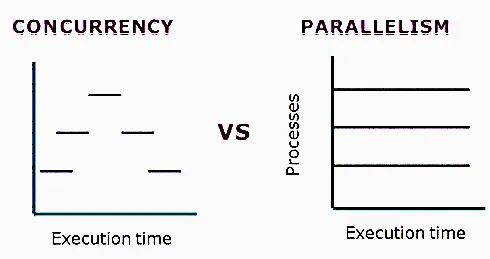
Section titled “Concurrency VS Parallelism”Concurrency and parallelism sound similar, but they mean different things. Concurrency means a program can handle multiple tasks at the same time by switching between them. Parallelism means multiple tasks actually run at the exact same time.
With concurrency, multiple tasks happen in overlapping time periods (this is called context switching), while with parallelism, multiple tasks run truly at the same time (using multiple CPU cores). You can get concurrency using things like threading and asyncio, while you get parallelism using multiprocessing.
Thread VS Process
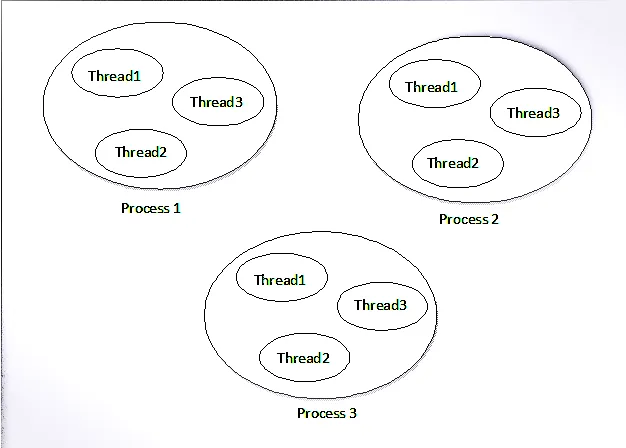
Section titled “Thread VS Process”A thread is a small, lightweight unit of work that shares the same memory with other threads in the same process. A process, on the other hand, is independent and has its own separate memory. Threads are usually good for tasks that involve waiting, like reading files or network calls (I/O-bound tasks), while processes are better for tasks that need heavy computing power (CPU-bound tasks). Threads talk to each other using shared memory, while processes talk to each other using inter-process communication (IPC) methods.
Threading
Section titled “Threading”Threading is a way to get concurrency in Python by running multiple threads inside a single process. Each thread can run alongside the others, sharing the same memory. When several threads run Python code, the GIL comes into the picture. And if those threads also need to use the same shared data, you might need a Mutex to avoid messing things up (this is called a race condition).
import threading
def task(task_name):    for _ in range(5):        print(f"Running {task_name}")
t1 = threading.Thread(target=task, args=("Task 1",))t2 = threading.Thread(target=task, args=("Task 2",))
t1.start()t2.start()t1.join()t2.join()
Shared Memory in Threading
Section titled “Shared Memory in Threading”Since threads share the same memory, they can read and change the same data. But this can cause problems if multiple threads try to change the same data at the same time (this is called a race condition). To avoid this, you can use a Mutex (threading.Lock) so that only one thread can touch the shared data at a time.
import threading
counter = 0
mutex = threading.Lock()
def increment():    global counter    for _ in range(100000):        with mutex:  # Acquire the lock before modifying the counter            counter += 1
t1 = threading.Thread(target=increment)t2 = threading.Thread(target=increment)t1.start()t2.start()
t1.join()t2.join()
print(f"Final counter value: {counter}")
Daemon Threads vs Non-Daemon Threads
Section titled “Daemon Threads vs Non-Daemon Threads”Daemon Threads
Section titled “Daemon Threads”Daemon threads are background threads that automatically stop when the main program ends. They’re meant for tasks that run quietly in the background and don’t need to finish before the program closes. Non-daemon threads work differently - they keep the whole program running until they’re fully done.
import threadingimport time
def background_task():    while True:        print("Running in the background...")        time.sleep(1)
# main thread will exit after 5 seconds, and the background thread will be# terminated automatically because it's a daemon thread.if __name__ == "__main__":
    # Set the thread as a daemon thread    # Note: we not join the thread because we want it to run in the    # background and not block the main thread.    t = threading.Thread(target=background_task, daemon=True)    t.start()
    print("Main thread is doing some work...")    time.sleep(5)    print("Main thread is exiting...")
# Output:# Main thread is doing some work...# Running in the background...# Running in the background...# Running in the background...# ...# Main thread is exiting...
Non-Daemon Threads
Section titled “Non-Daemon Threads”Non-daemon threads will keep the program running until they’re completely finished. If you create one of these and don’t join it, the program won’t close until that thread is done with its work.
import threadingimport time
def background_task():    while True:        print("Running in the background...")        time.sleep(1)
if __name__ == "__main__":    # Set the thread as a non-daemon thread (default)    t = threading.Thread(target=background_task)    t.start()
    print("Main thread is doing some work...")    time.sleep(5)    print("Main thread is exiting...")
# Output:# Main thread is doing some work...# Running in the background...# Running in the background...# Running in the background...# ... (it will keep running indefinitely until you manually stop the program)
Multiprocessing
Section titled “Multiprocessing”Multiprocessing is how you get real parallelism in Python, by creating multiple separate processes. Each process has its own memory and runs on its own. This lets you make use of multiple CPU cores for tasks that need a lot of processing power.
import multiprocessing
def task(task_name):    for _ in range(5):        print(f"Running {task_name}")
# The __name__ == "__main__" check is required when using multiprocessing,# Without it, each new process may re-run the entire script, causing# infinite process creation and a RuntimeError.if __name__ == "__main__":    p1 = multiprocessing.Process(target=task, args=("Task 1",))    p2 = multiprocessing.Process(target=task, args=("Task 2",))    p1.start()    p2.start()
    p1.join()    p2.join()
Shared Memory in Multiprocessing
Section titled “Shared Memory in Multiprocessing”Since each process has its own separate memory, they can’t directly share data with each other like threads can. But the multiprocessing module gives us ways to share data between processes anyway, either through shared memory or through inter-process communication (IPC) tools like queues and pipes. When more than one process tries to change the same shared memory (like a Value or Array), you usually need locks to avoid race conditions.
We can use things like Queue and Value from the multiprocessing module to pass data between processes. For example, here’s how to use a Queue and a Value to send data from one process to another:
# queue_example.pyfrom multiprocessing import Process, Queue
def worker(q):    print("Worker is putting data in the queue")    q.put("Hello from the worker process!")
if __name__ == "__main__":    q = Queue()    p = Process(target=worker, args=(q,))    p.start()    print(q.get())    p.join()
# value_example.pyfrom multiprocessing import Process, Value
def worker(counter): for _ in range(100000): with counter.get_lock(): # Ensure that only one process can update the counter at a time counter.value += 1
if __name__ == "__main__": counter = Value("i", 0) p1 = Process(target=worker, args=(counter,)) p2 = Process(target=worker, args=(counter,)) p1.start() p2.start() p1.join() p2.join() print(f"Final counter value: {counter.value}")Deadlock
Section titled “Deadlock”A deadlock happens when two or more threads or processes are stuck waiting on each other to let go of something they need, so none of them can move forward. This usually happens when threads or processes try to grab locks in different orders. For example, if Thread A is holding Lock 1 and waiting for Lock 2, while Thread B is holding Lock 2 and waiting for Lock 1, both of them end up stuck waiting forever on each other. This situation is called a deadlock.
import threadingimport time
lock1 = threading.Lock()lock2 = threading.Lock()
def thread1():    with lock1:        print("Thread 1 acquired lock 1")        time.sleep(1)        with lock2:            print("Thread 1 acquired lock 2")
def thread2():    with lock2:        print("Thread 2 acquired lock 2")        time.sleep(1)        with lock1:            print("Thread 2 acquired lock 1")
t1 = threading.Thread(target=thread1)t2 = threading.Thread(target=thread2)
t1.start()t2.start()
t1.join()t2.join()
# Output:# Thread 1 acquired lock 1# Thread 2 acquired lock 2# (Both threads are now waiting for each other to release the locks, resulting in a deadlock)
Global Interpreter Lock (GIL)
Section titled “Global Interpreter Lock (GIL)”The GIL (Global Interpreter Lock) is a special kind of lock used inside Python’s CPython interpreter. Its job is to make sure that only one thread can run Python code at any given moment. In simple words, the GIL only lets one thread use the Python interpreter at a time. Every other thread has to wait for its turn.
Multiple threads can take turns using the Python interpreter through context switching, but because of the GIL, only one thread can actually run Python code at any single moment.
Think of it like a room with only one microphone, and several people who want to talk. Even though everyone is ready to speak, only the person holding the microphone can actually be heard. Once they’re done, the microphone gets passed to someone else.
The GIL works in pretty much the same way. Even if you create multiple threads, only one of them can run Python bytecode at any given time.
import threading
def task():    for _ in range(5):        print("Running")
t1 = threading.Thread(target=task)t2 = threading.Thread(target=task)
t1.start()t2.start()
t1.join()t2.join()
In the example above, both t1 and t2 are running, but they don’t run their Python code at the exact same moment. The GIL lets one thread run for a bit, then switches over to the other thread after a short while.
The GIL helps Python keep memory management safe and keeps the interpreter simpler overall. But it does not protect your shared variables from race conditions.
For example:
counter = 0
def increment():    global counter    counter += 1
If multiple threads try to change counter at the same time, you can still end up with wrong results. In cases like this, you need a Mutex (threading.Lock) to keep the shared data safe.
A Mutex (which stands for Mutual Exclusion) is just a lock that makes sure only one thread can use a shared resource at any given time.
Imagine two people trying to write in the same notebook at the same time. Without some kind of rule in place, they might end up writing over each other’s work and making a mess. A mutex works like a key to that notebook - whoever is holding the key gets to write, and everyone else has to wait until the key is given back.
For example, say we have a variable called counter that’s shared between two threads (t1 and t2). Both threads want to increase the value. If they both try to do it at the exact same time, the final result could end up wrong. To stop this from happening, we use a mutex so only one thread can update the counter at any given moment.
import threading
counter = 0mutex = threading.Lock()
def increment():    global counter
    for _ in range(100000):        mutex.acquire()  # Take the lock        counter += 1        mutex.release()  # Give back the lock
t1 = threading.Thread(target=increment)t2 = threading.Thread(target=increment)
t1.start()t2.start()
t1.join()t2.join()
print(f"Final counter value: {counter}")
Without the mutex, both threads could try to update counter at the same time and end up with a wrong final value. With the mutex in place, one thread updates the counter while the other one waits its turn, so the result stays correct and predictable.
Asyncio
Section titled “Asyncio”Asyncio is a Python library that helps you write asynchronous functions.
An asynchronous function is a function that can pause what it’s doing, let some other task run for a while, and then pick back up right where it left off. This comes in handy when a task is just waiting around for something slow to finish, such as:
- Making an API or network request
- Reading or writing a file
- Querying a database
Without asyncio, your program just sits there waiting for these slow tasks to finish before doing anything else. With asyncio, your program can work on other things while it waits.
Asyncio gives you two main keywords to work with:
async- Used to create an asynchronous function.await- Used to pause an async function until something it’s waiting on is finished.
The await keyword can only be used inside an async function, and only with things that support being awaited. It’s mainly used for operations that don’t block the rest of the program.
import asyncio
async def greet():    print("Hello")    await asyncio.sleep(2)  # Wait for 2 seconds without blocking    print("World")
async def main():    await asyncio.gather(greet(), greet())  # Run two greet tasks concurrently

if __name__ == "__main__":    asyncio.run(main())
# Output:# Hello# Hello# World# World
In this example, asyncio.sleep(2) pauses the function for 2 seconds, but without blocking the rest of the program. During this pause, other async tasks get a chance to run.
Event Loop
Section titled “Event Loop”The event loop is basically the engine that runs asyncio. It manages and schedules all the asynchronous tasks. When you call asyncio.run(), it creates an event loop, runs your async function inside it, and then shuts the loop down once everything is finished.
The event loop lets multiple async tasks run side by side. When one task is just waiting around (like during await asyncio.sleep(2)), the event loop can switch over to another task that’s ready to go.
Asyncio with Threads
Section titled “Asyncio with Threads”We can use asyncio together with threads to run blocking code without freezing up the event loop. This is useful when you have tasks involving I/O that could otherwise block other tasks from running. This is just a quick introduction to show you how asyncio and threads can work together. You can read more about it in the official documentation.
concurrent.futuresis a module that gives you an easy, high-level way to run functions using threads or processes without blocking the rest of your program. It lets you run blocking code in a separate thread or process while keeping the main event loop free to do other things.
import asyncioimport timefrom concurrent.futures import ThreadPoolExecutor
def blocking_task():    print("Starting blocking task...")    time.sleep(3)  # Simulate a long-running operation    print("Blocking task completed!")    return "Result from blocking task"

async def main():    loop = asyncio.get_running_loop()    with ThreadPoolExecutor() as pool:        # Run the blocking task in a separate thread and await its result        data = await loop.run_in_executor(pool, blocking_task)    print(f"Received: {data}")
if __name__ == "__main__":    asyncio.run(main())
# Output:# Starting blocking task...# Blocking task completed!# Received: Result from blocking task
Asyncio with Processes
Section titled “Asyncio with Processes”We can also pair asyncio with processes to run heavy CPU tasks without freezing up the event loop. This comes in handy when your tasks need a lot of processing power, but you still want the event loop to stay responsive. This is just a quick introduction to show you how asyncio and processes can work together. You can read more about it in the official documentation.
concurrent.futuresis a module that gives you an easy, high-level way to run functions using threads or processes without blocking the rest of your program. It lets you run blocking code in a separate thread or process while keeping the main event loop free to do other things.
import asyncioimport timefrom concurrent.futures import ProcessPoolExecutor
def cpu_bound_task():    print("Starting CPU-bound task...")    total = 0    for i in range(10**7):        total += i    print("CPU-bound task completed!")    return total
async def main():    loop = asyncio.get_running_loop()    with ProcessPoolExecutor() as pool:        # Run the CPU-bound task in a separate process and await its result        result = await loop.run_in_executor(pool, cpu_bound_task)    print(f"Result from CPU-bound task: {result}")
if __name__ == "__main__":    asyncio.run(main())
# Output:# Starting CPU-bound task...# CPU-bound task completed!# Result from CPU-bound task: 499999999500000000